Access your Files
If you are connected to home's wifi.
1. Access from Windows/ Mac File Explorer 📁
- Navigate to File Explorer on your Computer
- Search for Network devices. Select "Zion"
- Enter your username (first name) and password. and Click "Ok"
For security do not check Remember my Credentials
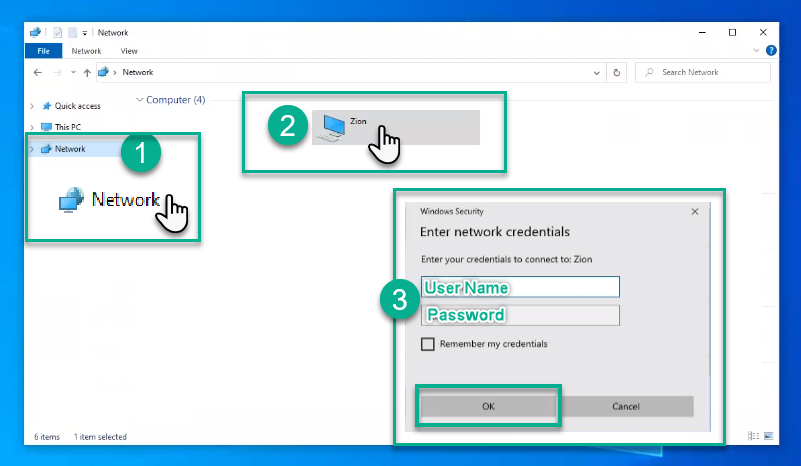
- Once authenticated, you should have access to the folders/files that your are assigned to.
If you are not connected to home's wifi
2. Access from your Web Browser 🌐
- Navigate to link.getview.cc/zion 🔗
⭐ Bookmark this link on your browser.
🔑 Password to access link is Our Postal Code.
- Enter your username (first name) and password. and Click "Ok"
For security do not check Stay Signed in. - Once you have entered the web portal, click on "File Station"
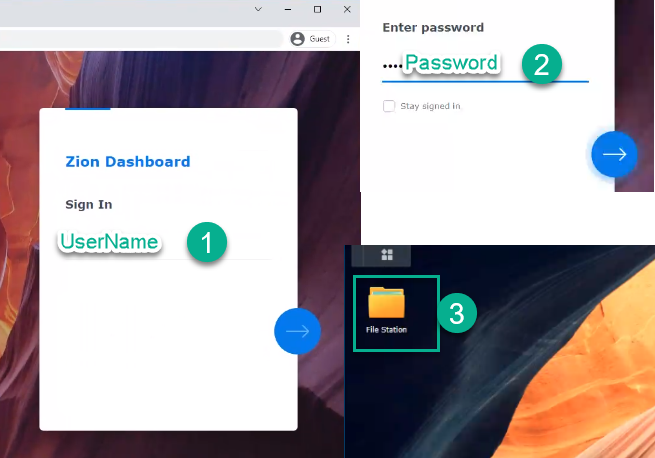
In the file station web app you should have access to the folders/files that your are assigned to.